




Transfer Images, Music and videos from phone.
Most of us used to make video clips and capture images with the mobile phones. At one stage we can't create any of them as the memory card is already full. In this case you can delete the files or transfer the files from the phone memory to another memory console.

When you want to transfer those captured images to your PC or Laptop you can transfer them by connecting your phone with the provided cord and using the installed software of the phone.
Other way is to take out the SD Memory card and insert in a card reader and connect it to your computer or laptop and transfer all the images and videos from the memory card.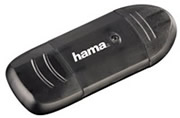
Check thoroughly for photos and videos in your phone as if you had set the saving destination as your phone. If you have any in the phone move them to the SD memory folder by using the phone option.
Also you can send these files to another phone by connecting them through the Bluetooth. But this is a time consuming process.
Best way is to use a SD memory card reader.
- Just take out the memory card from the phone and insert it in the card reader as per directed.
- Insert it in the PC or laptop, once it is recognized open its folder and copy paste the files.
- Don't delete the files from there.
- Put it in the phone again and delete the copied files.
- Also you can use a card adaptor.
- Insert your SD memory card in to the adaptor.
- Insert it in the card reader and insert it in the USB port of the PC and get those captured files.
There is multi card reader with slots for to insert different size of memory cards.
Also you can remove the SIM card from your Dongle and can insert the memory card in to it and can connect to your computer and can transfer those files to your computer.
When transferring from memory card just copy and paste the files. Never cut and paste them because when you insert the memory card in to your phone, the phone may not recognize the card.
In Colombo you can buy SD memory cards and card readers at the Unity Plaza complex stores.